

The right alert, to the right person, at the right time
Alert Routing & Smart Workflows
Most monitoring tools send every alert to the same channel. Staging and production treated the same. Everyone paged at once. No escalation when someone misses it. Uptimy routes alerts by severity, service, and team so the right person gets notified, and only them.
- 03:07:02checkout failing · confirmed
03:07 · the problem
Why Bad Alert Routing Is an Operational Problem
The issue is not that teams fail to get alerted. They get too many alerts, routed badly. Four failure modes come up repeatedly:
Staging and production look identical
A CSS change on staging fires the same Slack message as a production database outage. The team learns to ignore the channel. When the real incident arrives, it looks like all the others.
The wrong person gets paged
No routing by service or team means the backend engineer wakes up at 2am for an infrastructure issue they cannot fix. Or everyone gets paged. Both erode trust in the alerting system.
Alert fatigue buries what matters
When most alerts turn out to be low-priority noise, on-call engineers stop treating every notification as urgent. The one that needs immediate action arrives looking the same as the rest.
No escalation when the first alert is missed
If the on-call engineer does not see the alert, nothing happens. No second notification, no escalation to a backup. The incident runs undetected until a customer reports it.
03:08 · where it breaks
How Alert Workflows Work
Trigger
Starts when a check fails, an incident is created, or a condition is met.
Filter
Route based on severity, service, environment, region, or custom tags.
Delay & Deduplicate
Wait before alerting, group duplicate events, batch low-priority notifications.
Escalate
If unacknowledged within a time window, escalate to the next responder or team.
Notify
Send to Slack, Discord, email, SMS, Teams, PagerDuty, webhooks, or status pages.
Automate
Trigger self-healing, run recovery scripts, or call external APIs.
07:30 · how Uptimy fixes it
Example: How One Team Routes Alerts
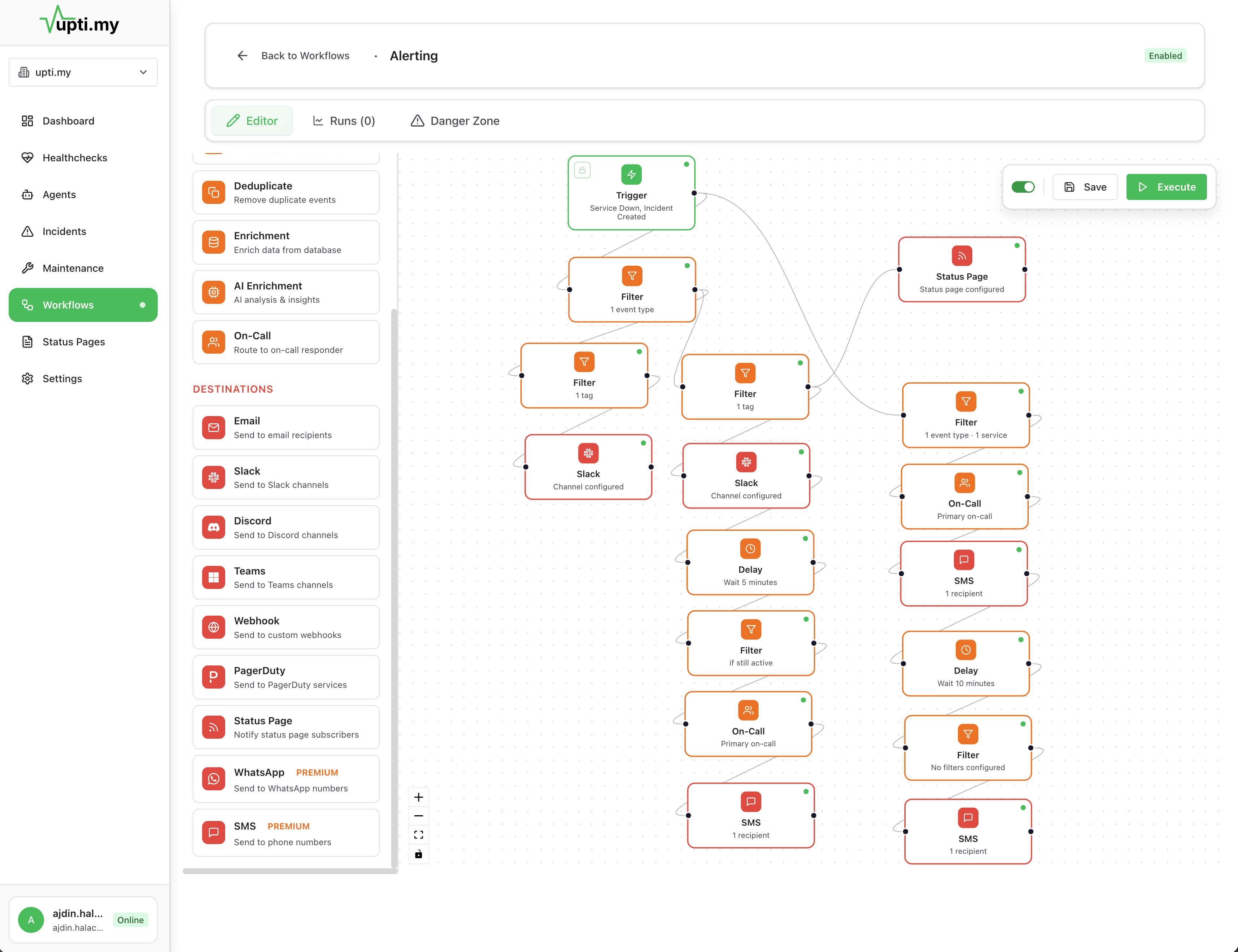
A SaaS team has a staging environment, a production API, and a production database. Each needs different alert behavior. Here is how they set it up in Uptimy:
Staging check fails
No escalation. No SMS. No status page update. Just a Slack message so the team sees it during work hours.
Production API returns 5xx
Slack first. If nobody acknowledges within 5 minutes, SMS goes to the on-call engineer. Status page component moves to Degraded.
Production database unreachable
Skips Slack entirely. SMS goes out immediately. If not acknowledged in 10 minutes, escalates to team lead. Status page moves to Major Outage. A self-healing workflow attempts a service restart.
Three services, three different behaviors, one platform. The staging alert does not wake anyone up. The database outage skips Slack entirely and goes straight to SMS. Setup for each takes about 2 minutes.
10:00 · set it up
Without Alert Routing vs. With Uptimy
Without routing
- Staging and production go to the same channel
- Everyone on the team gets paged for every failure
- Missed alert means no escalation, no backup notification
- Status page requires manual update during an active incident
- Alert channels become noise, real incidents get missed
With Uptimy
- Staging alerts go to Slack only, production escalates to SMS
- Alerts route by service and severity to the right person
- Escalation runs automatically if unacknowledged
- Status page updates as part of the alert workflow
- Deduplication keeps channels clean and actionable
13:00 · fits your stack
What You Can Do with Alert Routing
Notification Channels
Slack
Channels, DMs, threads
Discord
Server channels, DMs
Telegram
Bot messages to chats and groups
X
Public posts from a status account
Bluesky
Posts with link cards
Mastodon
Any instance, via access token
Individual or team addresses
SMS
Direct text messages
Microsoft Teams
Channels and conversations
PagerDuty
On-call integration
Premium messaging
Linear
Create issues from incidents
GitHub Issues
Open issues automatically
Railway
Trigger restarts and redeploys
Custom Webhooks
Any HTTP endpoint
Status Pages
Automatic public updates
17:00 · questions
Frequently Asked Questions
Alert routing workflows filter, deduplicate, and route alerts based on rules you define. Instead of every check failure notifying every team member, alerts go to the right person based on severity, service, time of day, or on-call rotation. Duplicate alerts are grouped, and low-priority issues can be batched or delayed.
Yes. You can create separate workflows for different services, environments, or teams. A database check failure can route to the infrastructure team, while an API failure routes to the backend team. Each workflow has its own escalation rules.
You can configure maintenance windows that suppress alerts for specific checks or services. Monitoring continues during maintenance so you have data, but notifications are held until the window ends. If a failure persists after maintenance, the alert fires.
Slack, Discord, Telegram, email, SMS, Microsoft Teams, PagerDuty, WhatsApp, Linear, GitHub Issues, Railway, social posts to X, Bluesky and Mastodon, custom webhooks, and automatic status page updates. You can use different channels for different severity levels or escalation stages.
Yes. Alert workflows can trigger webhooks, or status page updates as automated actions. For example, a critical alert can restart a service via a self-healing node, notify the on-call engineer, and update the status page all in one workflow.
20:00 · keep exploring
Related Topics
Incident Management
Detection, escalation, response, and communication in one place.
Workflow Monitoring
Track multi-step processes and catch silent failures.
Status Pages
Public and private status pages updated automatically.
Compared to Basic Uptime Monitoring
Why checking if the site is up is not enough.
23:00 · goodnight
Stop wondering if production is okay.
Tonight, if something breaks, you will know first — with the context to fix it and a status page that keeps customers informed. And if nothing breaks, you get to sleep.
Free plan available · No credit card required · Cancel anytime