

Monitor the workflows behind your product
Workflow Monitoring
Track multi-step workflows, validate the data between steps, and catch silent failures before customers do.
Monitor booking flows, webhooks, imports, syncs, queue workers, reminders, and other background workflows from one place.
- 03:07:02incident.created · worker crashed
03:07 · the problem
Why Workflow Monitoring Matters
Most monitoring tools tell you whether a service is up or whether a job ran. That still leaves a big blind spot.
A workflow can:
- ✓start successfully
- ✓move through multiple steps
- ✓trigger downstream systems
- ✗and still fail logically because the wrong data moved through it
Workflow monitoring helps you see where the process broke, which step produced invalid data, and what happened next.
03:08 · where it breaks
What You Can Monitor
Booking & Scheduling Workflows
Reservations, appointments, calendar syncs
Webhook Processing Workflows
Receive, validate, and act on external events
Import & Sync Workflows
File uploads, row parsing, record validation
Queue & Worker Pipelines
Job queues, background workers, result persistence
Reminder & Notification Flows
Scheduled messages, delivery confirmation
AI & Enrichment Workflows
Data enrichment, model inference, result storage
Document Processing Workflows
Upload, parse, validate, and store documents
Payment & Order Workflows
Charge, fulfill, notify, and reconcile orders
With Uptimy, you can monitor:
07:30 · how Uptimy fixes it
What a Silent Failure Looks Like
A booking platform runs this workflow every time a customer schedules an appointment:
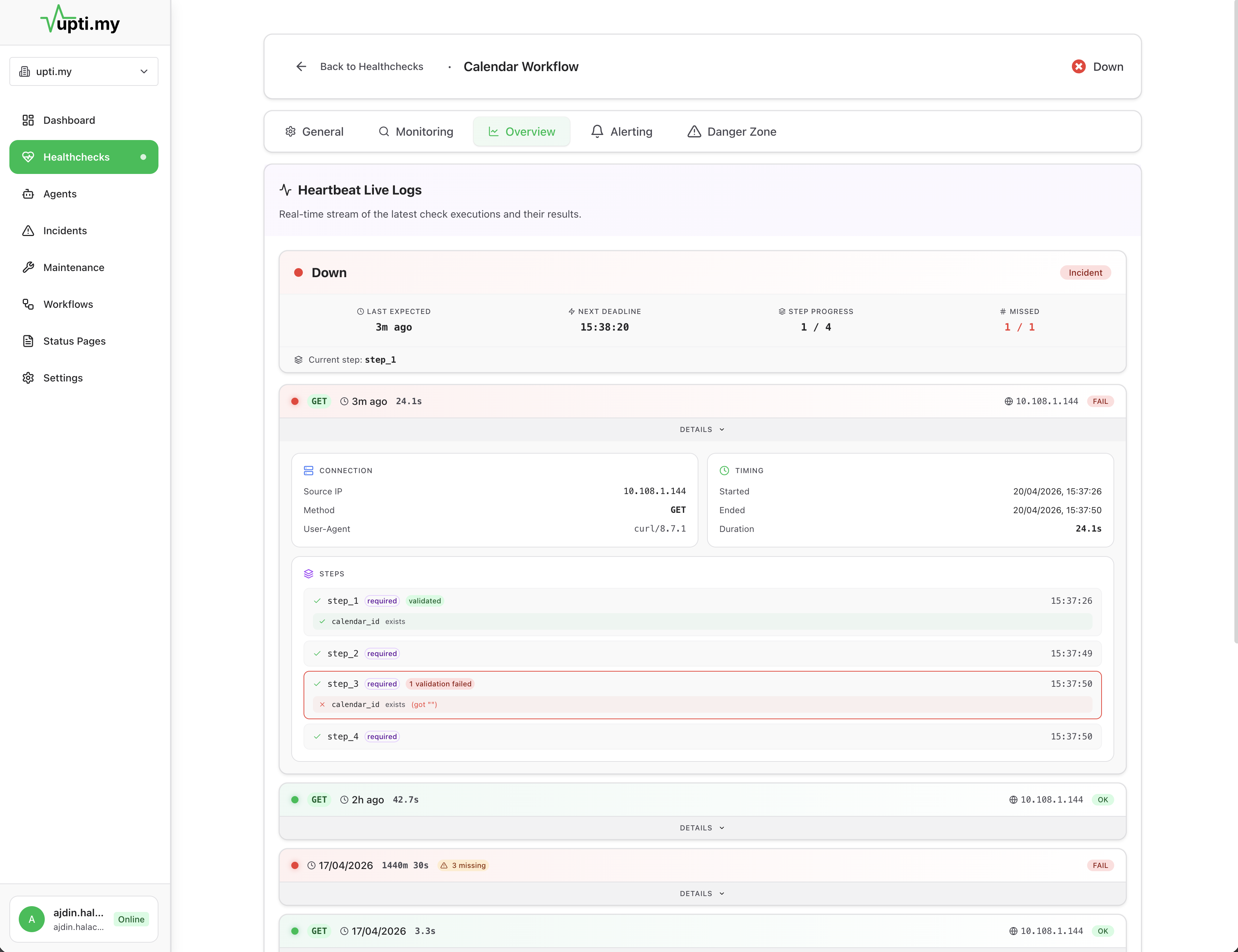
Sync completes but receives empty calendar_id from step 3
What the team sees: Every step reported success. No errors in logs. The cron monitor says the job ran and finished on time.
What actually happened: Step 3 passed an empty calendar_id to step 4. The sync completed against an empty value. The provider never received the appointment. The customer shows up and nobody is there.
What Uptimy catches: Step 4 received invalid data. The calendar_id field failed validation. Alert fires before the appointment happens.
13:00 · fits your stack
How Workflow Monitoring Goes Deeper
Example Workflows
Booking Workflow
Webhook Workflow
Import Workflow
Queue Workflow
Heartbeat Monitoring vs Workflow Monitoring
| Question | Heartbeat | Workflow |
|---|---|---|
| Did the job start? | ||
| Did the job finish? | ||
| Did it finish on time? | ||
| Did each step execute? | No | |
| Did steps run in the right order? | No | |
| Was the data between steps valid? | No | |
| Which step broke the pipeline? | No | |
| Did the downstream action actually fire? | No |
17:00 · questions
Frequently Asked Questions
Cron job monitoring tells you whether a job ran and whether it finished on time. Workflow monitoring goes deeper. It tracks each step in a multi-step process, validates the data flowing between steps, and detects logical failures even when every individual step reports success.
You can monitor any multi-step background process: booking and scheduling workflows, webhook processing, file imports and syncs, queue worker pipelines, reminder and notification flows, AI and enrichment workflows, document processing, and payment or order workflows.
Yes. Uptimy validates required fields and data integrity between workflow steps. A step can complete successfully but pass invalid or missing data to the next step. Uptimy catches these silent, logical failures that exit codes and heartbeats miss.
You send lightweight check-in events from each step of your workflow using our API or SDK. Uptimy tracks the order, timing, and data validity of each step, alerting you when something deviates from the expected flow.
No, it complements them. Uptime monitoring checks whether your services are reachable, heartbeat monitoring checks whether jobs run on schedule, and workflow monitoring validates that the right data moves through multi-step processes correctly.
20:00 · keep exploring
Related Topics
23:00 · goodnight
Stop wondering if production is okay.
Tonight, if something breaks, you will know first — with the context to fix it and a status page that keeps customers informed. And if nothing breaks, you get to sleep.
Free plan available · No credit card required · Cancel anytime