

From detection to resolution, in one place
Incident Management
Incidents are created from real check failures with full context. Alerts route to the right team. Status pages update automatically. No more switching between tools during an outage.
- 03:07:02Created · checkout confirmed down
03:07 · the problem
The Problem with Disconnected Incident Management
When your monitoring tool and your incident tracker are separate systems, every incident starts with manual work: someone has to notice the alert, create the incident, copy the context, notify the team, and update the status page. Each step takes time and can be forgotten.
During an outage, time is the most expensive resource. Every minute spent on coordination is a minute not spent on resolution.
Delayed incident creation
Someone has to see the alert and decide to create an incident. If they are asleep or in a meeting, the incident is not tracked.
Lost context between tools
The monitoring tool knows what failed and when. The incident tool does not. Someone copies the information manually, often incomplete.
Status page falls behind
Updating the status page is a separate task that gets deprioritized during an active incident. Customers see no communication.
Timeline is reconstructed after the fact
Without automatic tracking, the incident timeline has to be rebuilt from Slack messages and memory during the retrospective.
03:08 · where it breaks
How It Works in Uptimy
Every step happens automatically. The team that responds starts with context and a timeline, not a blank incident form.
07:30 · how Uptimy fixes it
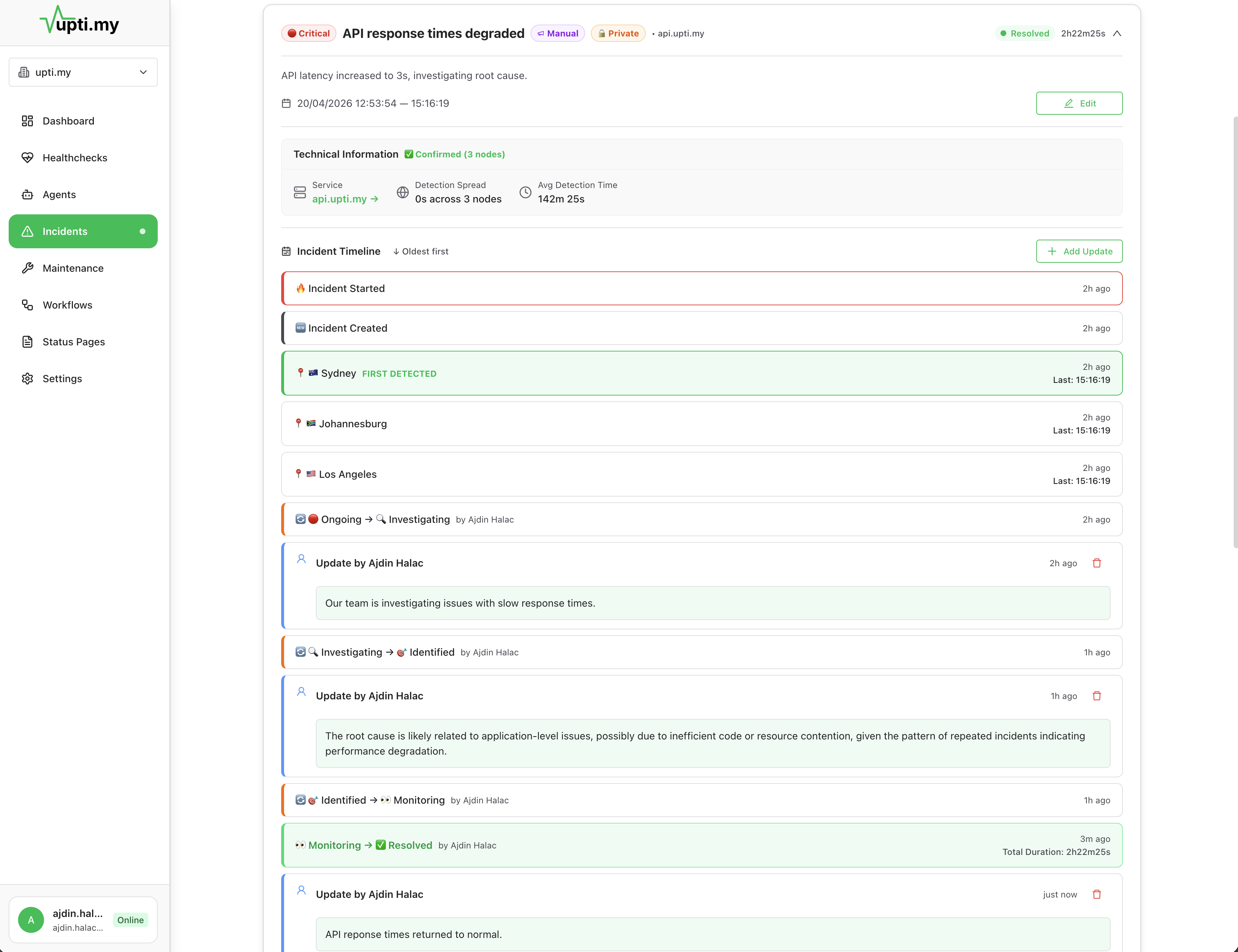
What an Incident Looks Like in Practice
Your API /v2/users starts returning 503 errors. Here is what happens when monitoring and incident management are connected:
What the responder sees when opening the incident:
- Which check failed and from which regions
- Response status code and body from each location
- When the failure started and how long it has been active
- Related incidents affecting the same service
- Self-healing action log (what ran, whether it worked)
- Full notification timeline (who was paged, who acknowledged)
Total time from detection to recovery: under 2 minutes. The on-call engineer was notified, the status page was updated, and the service was restarted. All from one platform.
13:00 · fits your stack
What Incident Management Includes
Automatic incident creation
Define conditions: number of failures, duration, regions. Incidents are created when conditions match.
Connected alert routing
Incidents trigger your alert workflow. Route by severity, service, or team. Escalate if unacknowledged.
Status page integration
Affected components update automatically. Add manual updates during the incident for additional context.
Full incident timeline
Creation, notifications, acknowledgment, updates, and resolution are all tracked automatically.
Team coordination
See who has been notified, who has acknowledged, and what actions have been taken.
Post-incident data
The full timeline is preserved for retrospectives. No manual reconstruction required.
17:00 · questions
Frequently Asked Questions
Incidents can be created automatically when a health check fails based on conditions you define (number of failures, duration, affected regions). You can also create incidents manually. Either way, the incident carries full context from the monitoring data.
Yes. When an incident is created, it can automatically create a status page update for affected components. When the incident resolves, the status page updates again. You can also add manual updates during the incident for additional communication.
Alert routing workflows control who gets notified and when. You can set up escalation chains so if the first responder does not acknowledge within a time window, the alert escalates to the next person or team. Routing can be based on severity, service, time of day, or custom conditions.
Each incident includes which check failed, when, from which monitoring location, what the response looked like, how long the failure has been active, and any related incidents. Your team starts investigating with data, not guesswork.
Yes. The full incident timeline is preserved: when it was created, who was notified, what actions were taken, when it was acknowledged, and when it resolved. This data is available for retrospectives without manual note-taking.
20:00 · keep exploring
Related Topics
Workflow Monitoring
Track multi-step processes and catch silent failures before users notice.
Alert Routing
Route alerts to the right team with escalation and deduplication.
Status Pages
Public and private status pages updated automatically from incidents.
Compared to Uptime Monitoring
See why uptime-only checks miss the failures incident teams actually handle.
23:00 · goodnight
Stop wondering if production is okay.
Tonight, if something breaks, you will know first — with the context to fix it and a status page that keeps customers informed. And if nothing breaks, you get to sleep.
Free plan available · No credit card required · Cancel anytime